This chatbot will decode entities like email and fullname directly from the user text with a simple ChatGPT prompt.
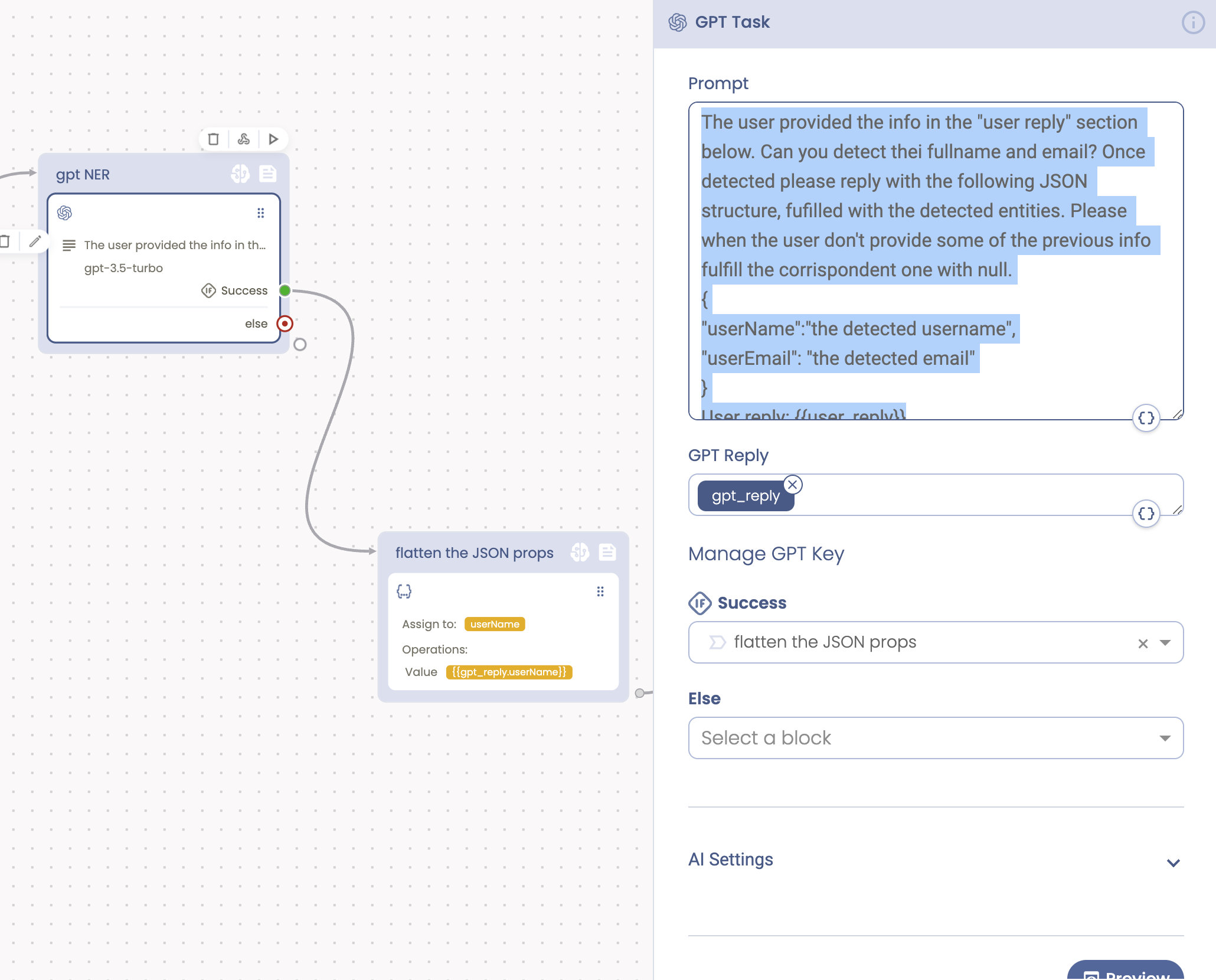
In this chatbot I used a special prompt to ask ChatGPT to reply me with a JSON structure with the entites I asked it to decode from the user text.
The used prompt:
The user provided the info in the "user reply" section below. Can you detect thei fullname and email? Once detected please reply with the following JSON structure, fufilled with the detected entities. Please when the user don't provide some of the previous info fulfill the corrispondent one with null.
{
"userName":"the detected username",
"userEmail": "the detected email"
}
User reply: {{user_reply}}
The prompt will reply with a JSON strcture fulfilled with the requested key/values.
I asked to use "null" values when entities are not recognised, so the corrispondent form fields are automatically triggered.
The returned JSON is automatically converted to a JSON object. The GPT Task action always checks if the returned GPT response has a JSON structure. In this case the returned payload is automatically converted to a JSON object.
Decoded entities are then moved into the conversation attributes as "flat" attributes, so they can be used within a form.
The form will ask the user for all the missing entities automatically.
Feel free to contact me at support@tiledesk.com